Articulation Trigger
The Articulation Trigger module switches between playing techniques on hosted instruments (sustain, pizzicato, tremolo, etc.). It works in conjunction with articulation maps configured in the mixer—the trigger activates articulations, but the map tells the instrument how to respond.
Articulation Maps and Triggers
The articulation system has two components that work together:
Articulation Map (Mixer)
Configured in the mixer for each instrument. The map defines what MIDI messages to send to switch articulations on that specific instrument—keyswitch notes, CC values, or program changes. Different sample libraries have different keyswitch implementations, so the map is tailored to each instrument.
Articulation Trigger (Output Row)
Configured per output row. The trigger defines when to switch articulations—which MIDI notes from your controller activate which articulation roles. When you press a trigger note, the trigger looks up the corresponding articulation in the map and sends the right message to the instrument.
Important: For the articulation trigger to work, you must have an articulation map set up for the instrument in that output row. Without a map, the trigger has no way of knowing what messages to send.
Roles
Roles are named articulation states. The articulation trigger assigns roles to trigger notes:
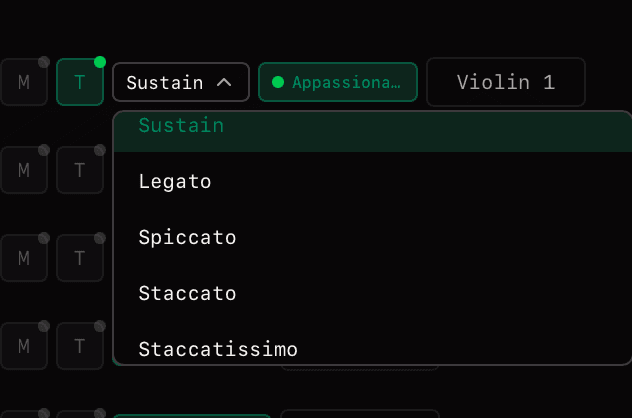
When you assign a role to a trigger note in the trigger, the system looks up that role in the articulation map to find out what MIDI message to send to the instrument.
Trigger Notes
Each role is associated with a Trigger Note—a MIDI note that, when received, activates that role.
Important: The trigger note itself is not passed to the instrument; it only switches the active articulation. The articulation map handles sending the actual keyswitch or CC message.
Setting Up Articulation Maps
In the mixer, each instrument can have an articulation map that defines how to switch articulations:
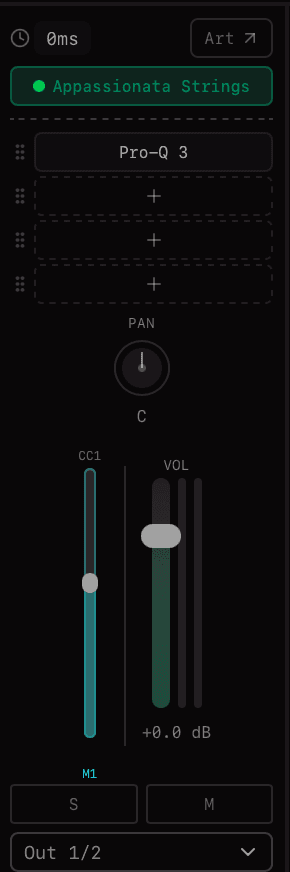
Articulation map in mixer channel
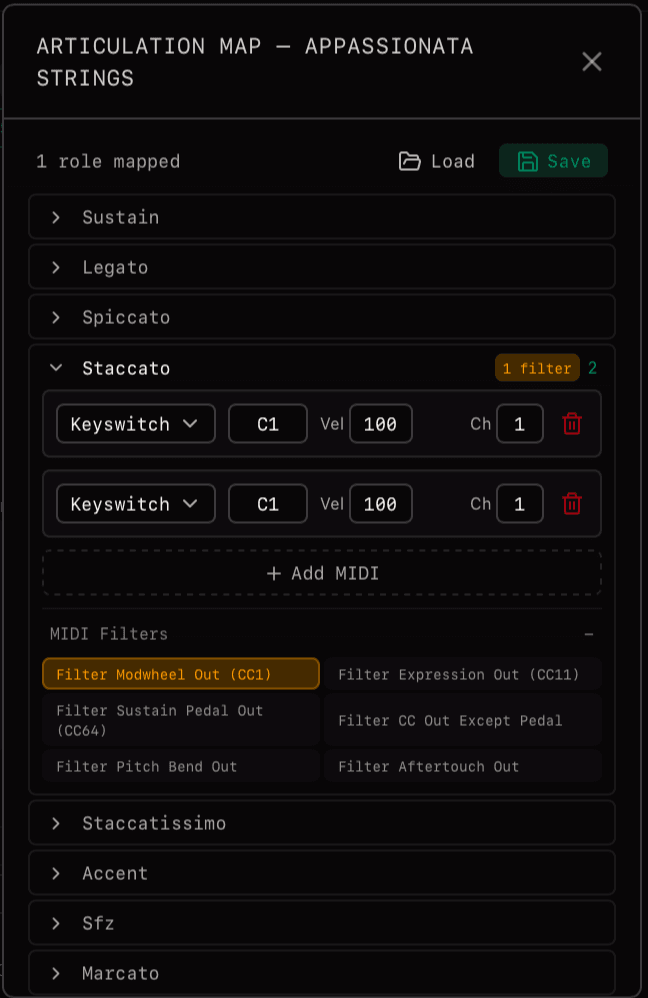
Configuring articulation mappings
Keyswitch Note
Send a specific MIDI note that the instrument recognises as a keyswitch. Most orchestral libraries use this approach—typically low notes outside the playing range.
CC Value
Send a CC message to change articulation. Some libraries use CC32 or other controllers to select articulations.
Program Change
Send a program change message to switch patches. Used by some older or simpler libraries.
Configure the map to match your instrument library's keyswitch implementation. Library documentation typically lists which notes or CC values trigger which articulations.
Workflow
- 1Set up the articulation map in the mixer — for each instrument, define which MIDI messages trigger which articulations
- 2Select articulation for that keyswitch — in the Articulation Trigger dropdown, choose which articulation role to assign
- 3Adjust on a per-keyswitch basis — each keyswitch can have a different articulation selected
Sound Setups and Articulation Maps
Articulation maps are saved as part of Sound Setups. When you save a Sound Setup, all your articulation maps for every instrument are preserved. Load that Sound Setup later and your articulation mappings are ready to go—no need to reconfigure for each project.
Related
Mailing list